Contact Us

Have questions?  Use this form to contact us.

We will respond to you as soon as possible.

Thank You,

Gary Detonnancourt


Harrisville, RI 02830
United States

More Than A Snapshot provides online photography education.

Booth Bay Harbor 2013-5410-color enhanced.jpg

Blog

This is the blog for More Than A Snapshot's Online Photography Classes.  In these blog posts I will give photography tips, tutorials, and show images.

September Photo Contest Theme: At Night

Gary Detonnancourt

MONTHLY PHOTO CONTEST

Get your tripods out its time for some night photography.  Please review my lessons on night photography in my online course "Learn to Create More Than A Snapshot" before you enter your images.

Every Month you may post 2 of your best images for our photo contest. To enter, please upload the images in the comment section below by clicking on the Landscape icon or you can use an image host like Flickr by pasting the embed link in the comment bar.  Please post each image in a separate comment for voting purposes.  A prize will be awarded to the first place image.  Please enter jpgs that are at least 1200 pixels on the longest edge.

I will post a new subject on last Thursday of the month.  The previous month's contest will end on the last Thursday of the month at 5 pm EST.  I or a guest judge will select the winners.

September CONTEST THEME:  At Night

PRIZES:  

YOU CHOICE OF A FREE COUPON FOR MY:

  • ONLINE PHOTOGRAPHY CLASS

  • PRINTING CLASS

  • COMPOSITION CLASS

  • LIGHTROOM CLASS

The winner needs to email gary@morethanasnapshot.com with your choice of the four courses listed above. Then I will respond with your coupon code.

Congratulations to James and Diana Duffy for winning August's contest.  You can see the judging here.

August Photo Contest Results for morethanasnapshot.com

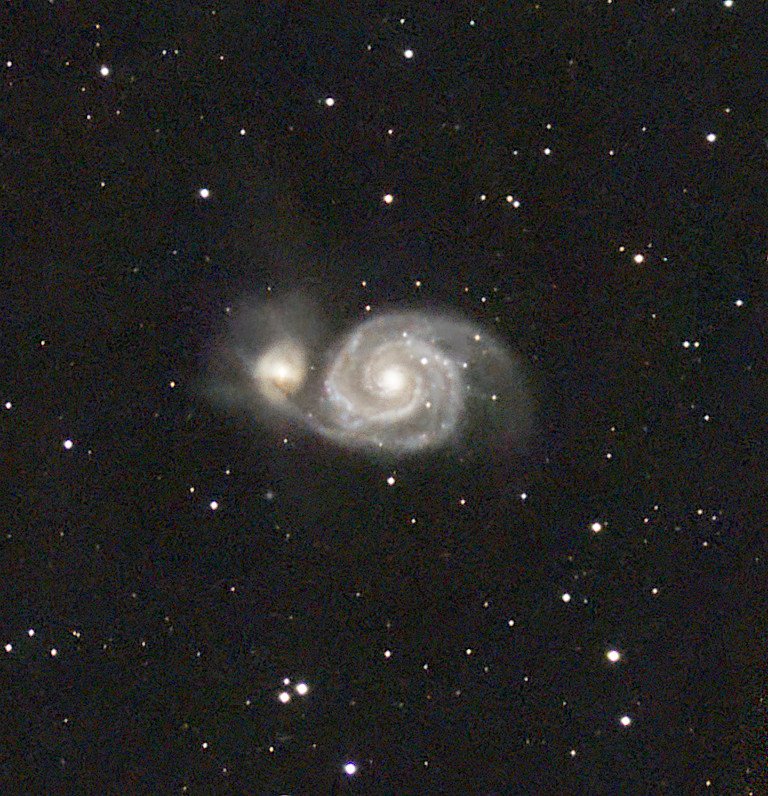
Astrophotography at Pemaquid Lighthouse

Gary Detonnancourt

I've done plenty of night photography but this was my first real attempt at astrophotography and it was a whole lot of fun.  I mentioned in a previous post that I purchased the Rokinon 24 mm f/1.4 specifically for astrophotography, but as it turns out it's a pretty great lens for landscapes too.

I shot these images while testing the lens for it's night time capabilities.  The first image is a composite of two exposures.  One exposure to correctly expose the sky and one to correctly expose the lighthouse, then the two images were blended together in Photoshop.

Pemaquid Lighthouse, Maine

As I was following the Milky Way, it led me to photograph this stand of pine trees.  The Lighthouse actually did the light painting on the trees during my 20-second exposure.  This image is actually a panorama of sorts.  When I made my first exposureI had just the tree tops and more sky, on the second exposure I lowered the camera to include more of the trees.  Later, when post processing I got the idea to put the two images together in Lightroom, which created this taller version.  I like it taller because it shows more of the Milky way and trees.  I wish I would have thought of while I was shooting the images because I could have made an image that went from the ground to the top of the Milky Way.

If you would like to learn some of these Lightroom adjustments, click here to sign up for a free 10 e-mail short course.  Or if you want to just jump right into my complete Lightroom course you can purchase it below.  Check it out it's on sale right now!

First Impressions of the Rokinon 24 mm F/1.4

Gary Detonnancourt

I bought the Rokinon 24 mm F/1.4 specifically for night photography.  The fast F/1.4 lens allows you to shoot astrophotography at lower ISO's and to get less noise in your images.  This lens is known for its sharpness and it doesn't have much coma.  Coma is the distortion of the stars at the edges of images.  The other option I was considering was the Sigma 20 mm F/1.4 but that lens in known for having issues with coma and the Rokinon is much cheaper.  

I haven't had time to take it out for any night photography yet, however, I did some landscape images at sunrise.  In this case, all of the images were shot at f/22 and this is a manual focus lens.

I had to return the first lens for problems with the focus ring.  It was frozen when I first opened the box and then it was very sloppy.  The second copy seems to be very good.  I've had friends that have had to return the lens many times till they received a good copy so don't give up on the lens if you don't get a good one right away.

I'm pleased with the results.  The lens was easy to focus and the images are sharp.  The color and contrast are nice and Lightroom even has the lens corrections for the Rokinon Lenses.  I can't wait to go out and try it on some stars.

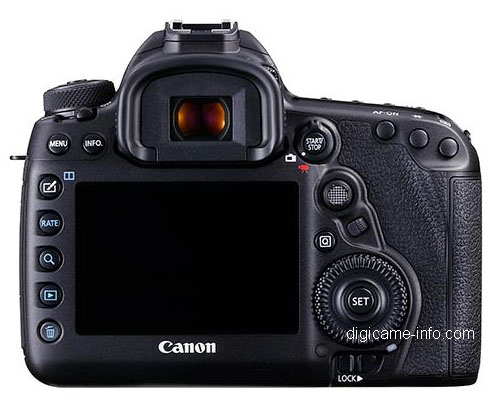
Product Photos and Full Specs for the Canon 5D Mark IV Leaked

Gary Detonnancourt

Product Photos and Full Specs for the Canon 5D Mark IV Leaked

The 5D Mark IV will sport a 30.4MP sensor, Dual Pixel AF, 61 point AF sensor with 41 cross-type, a 150,000-pixel RGB + IR sensor, 7fps continuous shooting, extended ISO from 100 to 102400, touchscreen LCD, dust and weather sealing, built-in WiFi, built-in GPS, NFC capability, 4K at 30fps, USB 3.0 and HDMI inputs, and a time-lapse movie mode.

http://petapixel.com/2016/08/17/product-photos-full-specs-5d-mark-iv-leaked/

Removing Distractions with the Perfect Eraser or a Clone Brush

Gary Detonnancourt

Original Image with distractions such as ropes, a car and porta johns.

I had recently made a video about how to remove distractions from an image using On1's Perfect Eraser tool.  However, the image I worked on had a simple blue sky background and it wasn't very challenging for the software to clone out some branches.  A youtube view asked to see a video of it cloning in a more challenging spot.  Click here to see the first video and look below to see the new video.  

Removing Distractions with the Perfect Eraser Tool:  Part II

As you can see from the video the Perfect Eraser tool works well, but it is a little slow.  It takes quite a bit of time to process each cloned area and I think you could do as well if not better with the clone tool or the patch tool in Photoshop.  Here is the image I ended up with after using the Perfect Eraser tool.  It did ok in some areas but there are many places that need to be cleaned up.

Results from just using the Perfect Eraser tool.

Next, I tried to clean up the image with a technique I saw from Aaron Nace by using a bokeh brush that he created to clone over objects that really didn't have enough pixels around it to use the clone tool.  I think the trick to using it well is using a low flow rate of around 8-10%.  I'm sure I didn't do as well as Aaron but I think it came out pretty well.

Using a Clone Brush to Remove Distractions:  Part III 

Final Result

Please post comments below to let me know what you thought of this post and how you think the final image came out.  Also please use the sharing tools on this page to share this post on your favorite social media sites.

Thank You,

Gary Detonnancourt

Last Night on the Lake

Gary Detonnancourt


August Contest Theme and July Contest Results

Gary Detonnancourt

MONTHLY PHOTO CONTEST

Every Month you may post 2 of your best images for our photo contest. To enter, please upload the images in the comment section below by clicking on the Landscape icon or you can use an image host like Flickr by pasting the embed link in the comment bar.  Please post each image in a separate comment for voting purposes.  A prize will be awarded to the first place image.

I will post a new subject on last Thursday of the month.  The previous month's contest will end on the last Thursday of the month at 5 pm EST.  I or a guest judge will select the winners.

August CONTEST THEME:  Open

PRIZES:  

YOU CHOICE OF A FREE COUPON FOR MY:

  • ONLINE PHOTOGRAPHY CLASS

  • PRINTING CLASS

  • COMPOSITION CLASS

  • LIGHTROOM CLASS

The winner needs to email gary@morethanasnapshot.com with your choice of the four courses listed above. Then I will respond with your coupon code.

Congratulations to Matt DiMaio for Fresh Fish Deliverd to the Misses.


Please post your entries in the comment section below.  Try to use an image that is at least 1024x768.